Webflow vs Shopify: The Complete 2026 Comparison
.avif)
.png)
.png)

.png)
.png)
.svg)
Choosing a platform isn’t always as straightforward as you think it is.
The first impression of nearly every platform is that it’s good enough to get the job done. Demos show how flexible they are. Case studies showcase the brilliant results. It’s only once the business begins to grow that the differences in how the platforms are built start to matter.
That’s why you need to take a closer look at comparisons like Webflow vs Shopify. Both platforms are popular and used widely, but for different purposes.
This article helps you make a pick between Shopify vs Webflow depending on what a business needs from its website over time.
What Is Webflow?
Webflow is a platform that is used to design, build, and manage custom websites without banking on templates or developers when you need to make even a tiny change.
With website builders, early on, things seem fine and work without any issues. It’s only a few months down the line, when adding new pages, campaigns, or making quick fixes, the site starts to feel like a Netflix series that ran one season too long. It starts to get inconsistent, messy, and feels like patchwork is holding it together.
Webflow is built with this in mind.
Shopify treats your website as a single entity, not a collection of separate pages. Your site’s layout is created once, and all new products automatically fit into the same layout.
Parts of the website that tend to change and grow, like landing pages, case studies, blog posts, and resources, by default follow the same structure, no need to redesign every time. It’s less “quick build” and more “long-term framework.”
Simply put, with Webflow, you get a site that’s not only good-looking but also usable, consistent, and adaptable long after launch.
What Is Shopify?
Shopify is an e-commerce platform that grows with you and your brand. It assumes that your business's primary motive is to sell, not just
today or tomorrow, but day after day. The entire layout is designed to keep it easy and effective for you to do just that.
Think of it as less of a website builder and more of a system that’s designed to run the day-to-day mechanics of selling online, from order to fulfilment. Even if something were to go wrong, it doesn’t need fixing at 2 a.m., because it has built-in processes that handle it.
Rather than focusing on visuals, that’s the core of the platform. So, you know you get predictability where it matters. And reliability beats novelty every time.
Simply put, Shopify’s aim is not to help you craft the perfect story, but to make sure your business runs seamlessly with no hiccups. And for companies that are e-commerce first, that’s the exact job a site needs to do.
Quick Comparison of Webflow vs Shopify
Choosing Webflow vs Shopify entirely depends on how you use your website. To help form a foundation for your decision, you can compare features of each platform. That’s the first step to zeroing in on one.
Shopify vs Webflow: Which Platform Is Best for Your Needs?
So now here’s where the real decision-making begins in Webflow vs Shopify. You need to understand what stage you’re in and where the business is headed.
Rather than a feature comparison, think long-term about what your team and website need to handle a few months down the line.
1. If you’re early on or don’t want to deal with technical stuff
Shopify is a good choice if:
- You want to get your site live fast without worrying a lot about structures and layouts
- You care about products, payments, and checkout working without any snags
- You’re okay working within a theme if it keeps things simple
Webflow is a better option if:
- You already have someone who can help you with design
- The website is not focused on transactions as much as positioning, storytelling, and credibility
It’s about what you want to prioritize with your website now, keeping in mind where it’s headed down the line.
2. If you’re a designer, agency, or brand-led team
Webflow should be your pick if:
- How the brand looks and feels matters to you. Things like layout, type, and interactions are not afterthoughts
- Your marketing pages change frequently, and sometimes you don’t have the time to wait for developers
- You want a website that adapts, doesn’t just sit put
Shopify will work, but:
- You’ll design around the platform, not with it
- Theme structure will dictate decisions more than you expect
3. If e-commerce is the main business and not a secondary feature
This is when Shopify should be your pick:
- Your revenue is based on how well your checkout works
- Whether you have complex pricing, bundles, subscriptions, or other offerings that require promotions
- Inventory, shipping, and taxes no longer fall under the "set-it-and-forget-it" umbrella and get increasingly difficult to manage as your e-commerce business continues to grow
Choosing Webflow ecommerce supports:
- A small catalog of products
- Limited-edition or seasonal drops
- “Buy now” alongside content
When selling starts to matter every single day, Shopify makes more sense.
4. If the heavy lifting is done by the content
Here, in Webflow vs Shopify ecommerce, Webflow is a better alternative when:
- Campaigns, guides, resources, and blogs make up your website structure
- Not every piece of content is the same shape or size
- What matters more to you is SEO and structure over product filters
While Shopify’s content strategies work, they are geared to help support your products instead of serving as a foundation for your website.
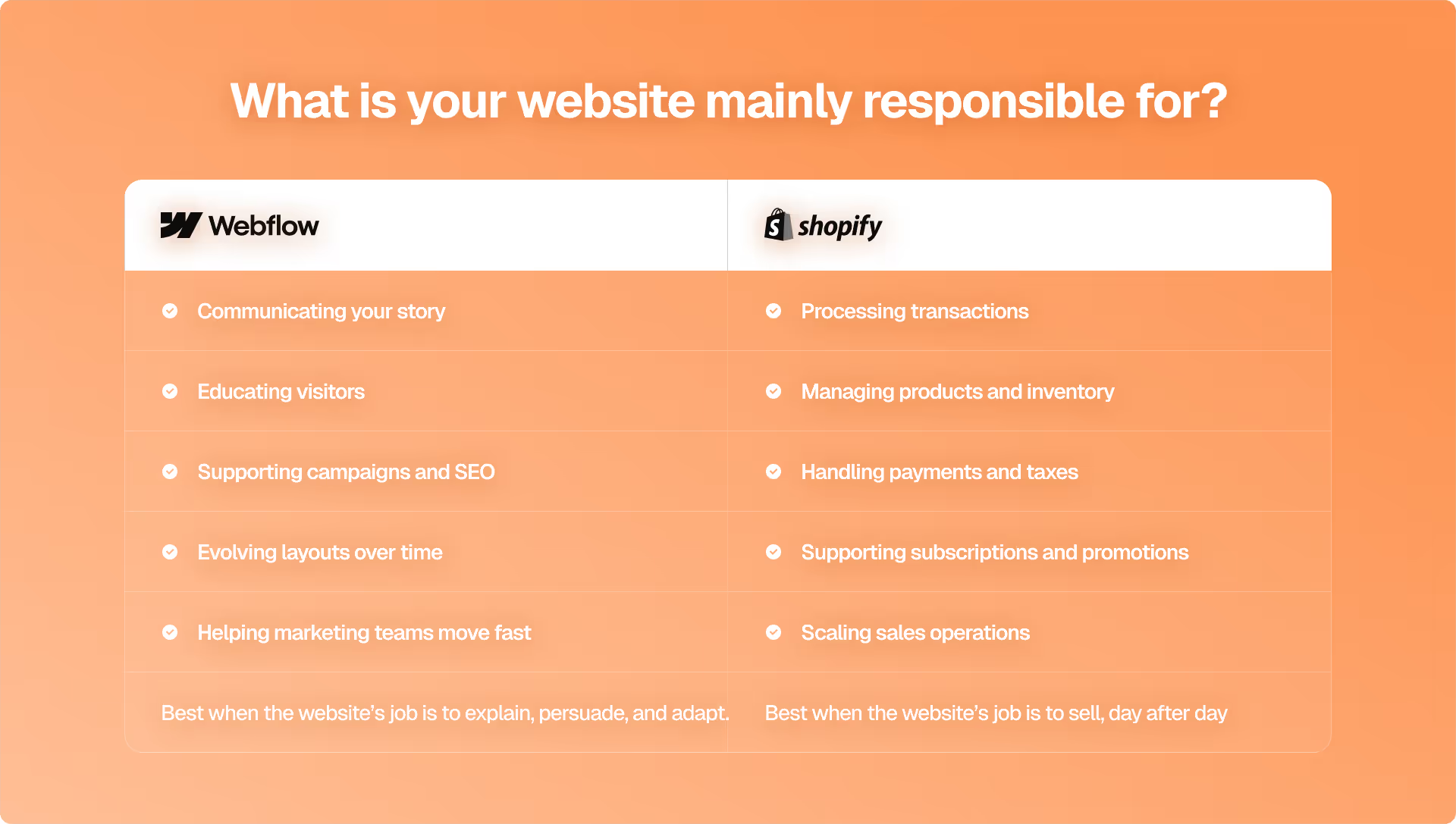
Instead of making this a battle of Webflow vs Shopify and debating which platform is better, it may be more helpful to ask:
What does your website need to handle most of the time, and who manages it day to day?
There are platforms that focus on content, brand experience, and interaction, and platforms that focus on transactions.
Much of the frustration surrounding Webflow vs Shopify stems from businesses wanting to use them for a purpose that they weren't built to handle.
- If a business's primary purpose is transactions, then the safest option would be Shopify
- If educating customers, building trust, and converting customers over time is the business’s primary goal, then Webflow is the best choice
- If your website sits somewhere in between, then the choice of Webflow vs Shopify will ultimately depend on which side your business expects to grow into
Most platform regret won’t come from the choice of Shopify vs Webflow for e-commerce. It comes from the failure to acknowledge when the goals and expectations of the website have evolved. And that’s the decision that actually matters.
The Real Decision Behind Webflow vs Shopify
Time and again, you see Webflow vs Shopify, the reason isn’t that one platform is better or can replace the other. It’s because modern websites need to do more than before – market, educate, convert, and sometimes operate an entire business.
When comparing Shopify vs Webflow for e-commerce, you can see that both platforms were developed with different goals in mind. These affect everything from how each team works together to where each website will experience friction, and the amount of ongoing effort required to keep a website running with the business's growth stages.
Here's Pixeto’s main takeaway: it's not that you chose the wrong tool. It's that you expect a platform to be something that it's not designed to be.
The primary purpose of a design-first system is to create visually attractive
designs that come with flexibility. In contrast, an e-commerce system is to provide a structured and reliable way to sell products. There is no “better” or “worse” approach; they each fulfil a different need.
The best choice is based on what your website must do moving forward, as opposed to how it appears at launch. That will likely be a choice that ages even better than a list of features.
FAQs
1. Which is better for e-commerce, Webflow or Shopify?
While both platforms support the e-commerce function, Shopify is a better choice if the core aspect of your business is selling products. Without any extra effort, functions like checkout, payments, inventory, shipping, and taxes work seamlessly. Webflow works for those who are considering selling products as a secondary option and also want to focus on storytelling and brand building.
2. Is Webflow harder to learn than Shopify?
For most people, yes. With Webflow, the learning curve is steeper if you’re new to layout concepts or design. But once you get the hang of it, you have more control. Shopify, on the other hand, is simpler because it walks you through everything you need to start selling, right from setting up products, payments, and checkout in a clear order.
3. Can I migrate from Shopify to Webflow or vice versa?
Migration is possible. However, it’s not as simple as a few clicks. You will be able to copy most website content and product information, but the remaining parts of the website (checkout functions) would probably need to be built from scratch. Companies typically migrate to a new platform only if there is a significant change in the website's purpose.
4. Which is better for SEO: Webflow vs Shopify?
Both platforms are good. Webflow is much more flexible in terms of how you can structure pages and what URLs look like. Shopify doesn't include as many built-in features for good on-page SEO. If you plan to build a large content-heavy website, then Webflow is a better bet.
5. Does Webflow have better design flexibility than Shopify?
Yes, Webflow allows complete control over the creation of layout and interaction, as well as controlling how pages adapt to various types of devices. Shopify's layouts are mainly determined by theme. To create custom layouts in Shopify, you need custom code to make those changes.
6. Is Shopify more scalable than Webflow for large e-commerce stores?
Yes, Shopify was designed specifically for businesses with growing product catalogs, high-volume orders, and complex business operations. Webflow is not designed to handle large-scale ecommerce processes.
7. Does Webflow support advanced e-commerce features in 2026?
Only to a limited extent. Generally speaking, the platform offers adequate support for basic e-commerce functionalities and features. Advanced e-commerce features such as subscription services, complex pricing, and large inventories typically require third-party apps or custom programming.
8. Which platform is cheaper for long-term use, Shopify or Webflow?
The use of the website determines the cost. Webflow is usually more predictable than Shopify. With Shopify, as you add apps, the costs of running a store will increase.



.svg)

